
The Complete Guide to CLAUDE.md: Best Practices, Examples, and Templates

Core Definition
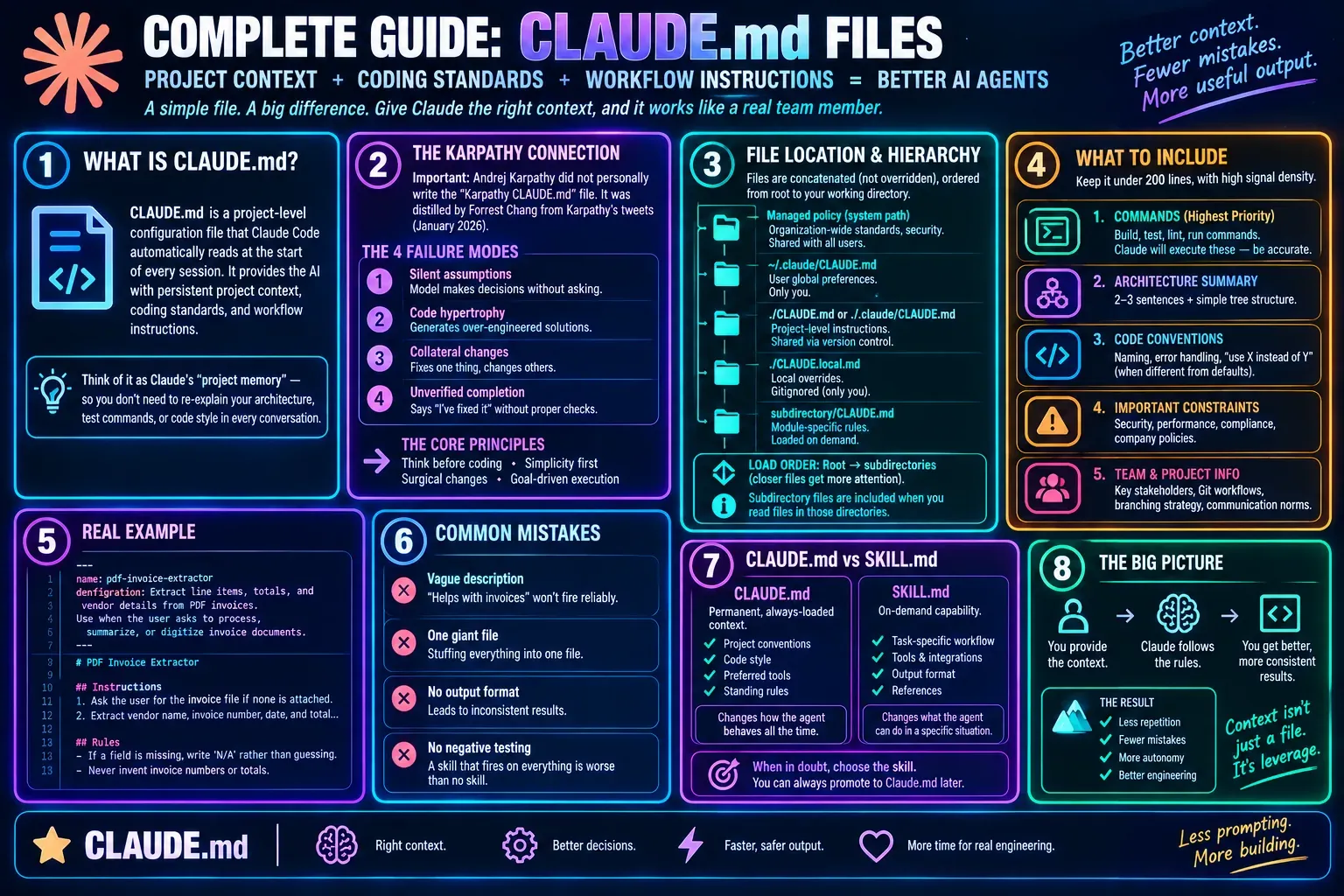
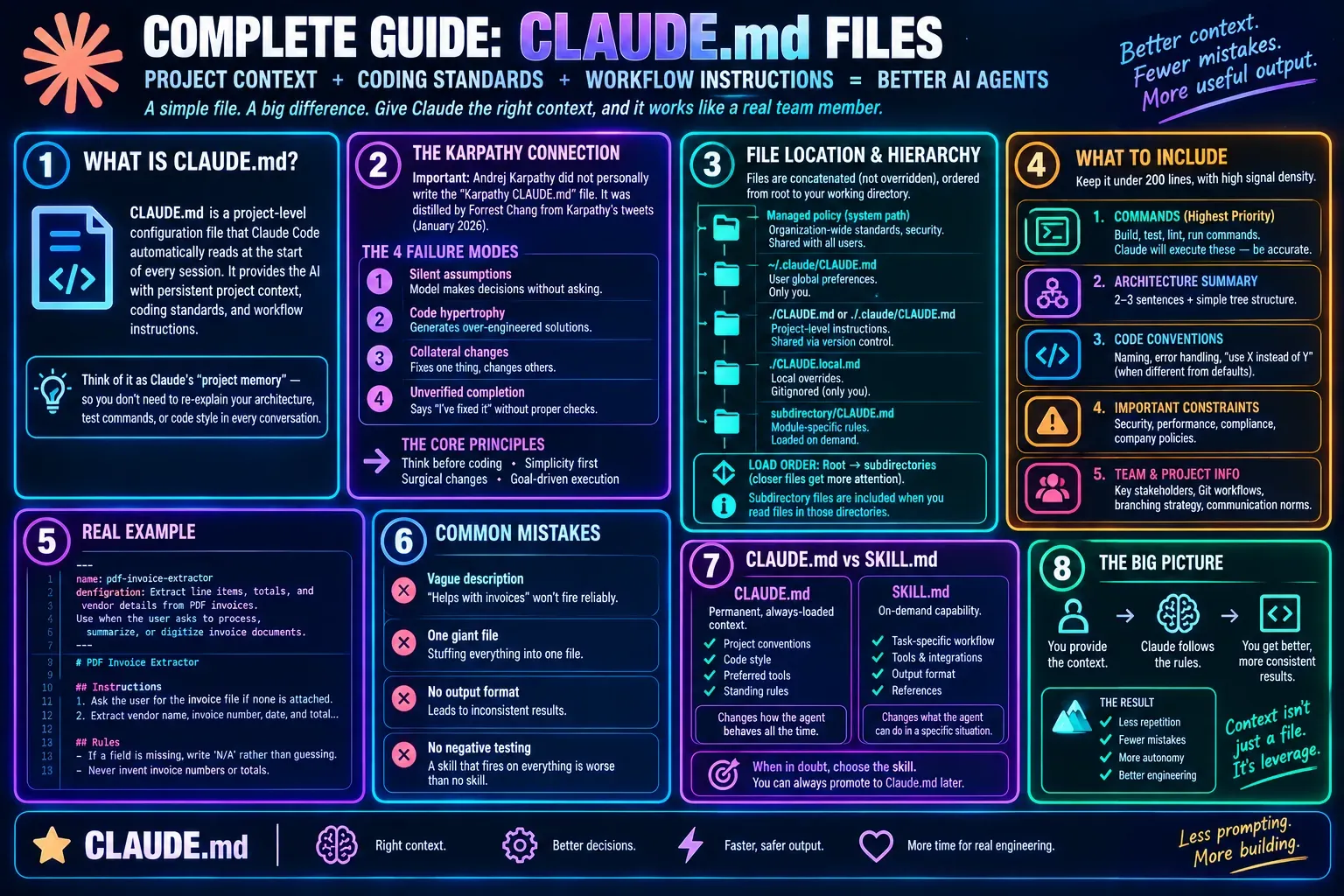
CLAUDE.md is a project-level configuration file that Claude Code automatically reads at the start of every session. It provides the AI with persistent project context, coding standards, and workflow instructions. Placed in the project root, it serves as Claude's "project memory"—you don't need to re-explain your project architecture, test commands, or code style in every conversation.
1. Karpathy-Related Clarification
Important fact: Andrej Karpathy did not personally write the widely circulated "Karpathy CLAUDE.md" file. That file was distilled by developer Forrest Chang from observations of Karpathy's tweets posted in January 2026.
Karpathy identified four systematic failure modes in AI coding that form the theoretical basis of that file:
-
Silent assumptions: The model makes decisions for you without asking. You say "optimize this endpoint," and it picks a solution silently without checking where the actual bottleneck is.
-
Code hypertrophy: You ask for a simple file parser, and it generates an "enterprise-grade" version with retry mechanisms, multi-encoding support, and configurable extensions you never requested.
-
Collateral changes: While fixing one bug, it refactors adjacent functions, renames variables, and deletes dead code—each change seems "reasonable" alone, but together they create an unreviewable PR.
-
Unverified completion: "I've fixed it." But did it run tests? Check boundary conditions? Verify compatibility? Often not, because you never defined what "done" means.
The core principles distilled from these observations are: think before coding, simplicity first, surgical changes, and goal-driven execution.
2. Boris Cherny's CLAUDE.md Example
The workflow CLAUDE.md publicly shared by Boris Cherny (creator of Anthropic Claude Code) is one of the clearest reference examples in terms of structure. Its core contents include:
Workflow Orchestration
- Plan mode first: Enter plan mode for any non-trivial task (3+ steps or architectural decisions).
- Subagent strategy: Actively use subagents to keep the main context window clean. One task per subagent for focused execution.
- Self-improvement loop: After every user correction, update
tasks/lessons.mdand write the lesson into the rules. - Verify before completion: Never mark a task complete without proving it works. Run tests, check logs, demonstrate correctness.
- Pursue elegance (balanced): For non-trivial changes, ask "Is there a more elegant way?" But skip this for simple, obvious fixes—don't over-engineer.
Task Management
- Plan first: Write plan to
tasks/todo.mdwith checkable items. - Verify plan: Check in before starting implementation.
- Track progress: Mark items complete as you go.
- Capture lessons: Update
tasks/lessons.mdafter corrections.
Core Principles
- Simplicity first: Make every change as simple as possible. Impact minimal code.
- No laziness: Find root causes. No temporary fixes. Senior developer standards.
- Minimal impact: Only touch what's necessary. No side effects with new bugs.
3. File Location and Hierarchy
CLAUDE.md supports a multi-level loading mechanism. Files are concatenated into context rather than overriding each other, ordered from the filesystem root down to your working directory:
| Location | Scope | Purpose | Shared With |
|---|---|---|---|
| Managed policy (system path) | Organization | Company-wide standards, security policies | All users in org |
~/.claude/CLAUDE.md |
User global | Personal preferences across all projects | Only you |
./CLAUDE.md or ./.claude/CLAUDE.md |
Project-level | Team-shared instructions | Team via version control |
./CLAUDE.local.md |
Local | Personal project-specific overrides | Only you (gitignored) |
subdirectory/CLAUDE.md |
Subdirectory | Module-specific rules | Loaded on demand |
Load order: Content is ordered from filesystem root down to your working directory. Instructions closer to where you launched Claude are read last and receive higher attention weight.
Subdirectory behavior: CLAUDE.md files in subdirectories under your working directory are not loaded at launch. They are included when Claude reads files in those subdirectories.
4. What to Include
The official recommendation is to keep it within 200 lines, maintaining a high signal density. Core contents:
1. Commands (Highest Priority)
Build, test, lint, and run commands. Claude will actually execute these commands, so accuracy is critical.
2. Architecture Summary
Explain the main components and their relationships in 2-3 sentences. A simple tree structure helps Claude understand where components live.
3. Code Conventions
Naming rules, error-handling patterns, and "use X instead of Y" decisions that differ from standard defaults.
4. Hard Constraints
Absolute boundaries, such as "tests must not write to the production database" and "never modify generated files in internal/db/".
5. Workflow
Define the standard process: explore → plan → code → commit. Include testing requirements and commit message format.
6. Custom Tools
The deployment, testing, and code generation tools used by the team, along with usage examples.
What NOT to include: Standard language conventions (PEP 8, Prettier defaults), full API documentation, obvious practices ("write clean code"), and information duplicated from README. A follow-up study found that auto-generated AGENTS.md files that duplicated existing README content actually reduced task success while increasing cost by 23%.
5. @import Syntax
CLAUDE.md supports importing other files via @path/to/file, with up to 5 levels of nesting. This lets you keep the root file concise while splitting detailed documentation into dedicated files.
    # See @README.md for project overview
    # See @package.json for available npm commands
    # Git workflow: @docs/git-instructions.md
    # Personal overrides: @~/.claude/my-project-instructions.md
Import behavior: Non-text files (images, PDFs) are skipped, nonexistent paths are silently ignored, and circular references are detected and blocked. The first time Claude Code encounters external imports in a project (paths resolving outside your working directory), it shows an approval dialog listing the files.
6. CLAUDE.md vs AGENTS.md
| Feature | CLAUDE.md | AGENTS.md |
|---|---|---|
| Scope | Claude Code native | Cross-tool standard (30+ agents) |
| Maintainer | Anthropic | Agentic AI Foundation (Linux Foundation) |
| @imports | Supported (5 levels) | Not supported |
| Path-scoped rules | Supported (.claude/rules/ + glob) |
Not supported |
| Local overrides | CLAUDE.local.md |
AGENTS.override.md (Codex) |
| Recommended size | Under 200 lines | 32 KiB default (Codex) |
Bridging the two: If your repository already uses AGENTS.md for other coding agents, create a CLAUDE.md that imports it so both tools read the same instructions without duplicating them:
@AGENTS.md
A symlink also works if you don't need Claude-specific content: ln -s AGENTS.md CLAUDE.md. On Windows, creating a symlink requires Administrator privileges, so use the @AGENTS.md import instead.
Measured impact: A Princeton study ran OpenAI Codex across 124 merged PRs and found that the presence of AGENTS.md reduced median runtime by 28.6% and token usage by 16.6%. The mechanism is straightforward: without the file, the agent spends time exploring directory structures, inferring build systems, and guessing test commands. With it, that context is provided upfront.
7. Best Practices
-
Use
/initto start: Run/initin the project directory, and Claude will automatically analyze the codebase and generate an initial CLAUDE.md draft. WithCLAUDE_CODE_NEW_INIT=1set,/initalso reads AGENTS.md, Cursor rules, and Copilot instructions. -
Commit to git: A project-level CLAUDE.md shared by the team should be included in version control so all members benefit.
-
Put personal preferences in the global file: Place cross-project rules such as "always run tests" and "prefer simple code" in
~/.claude/CLAUDE.md, keeping it concise. -
Use
.claude/rules/for larger projects: Organize instructions into topic-focused files with descriptive filenames liketesting.mdorapi-design.md. Rules can be scoped to specific file paths using frontmatter, so they only load when Claude works with matching files. -
Use HTML comments for maintainer notes: Block-level HTML comments (
<!-- maintainer notes -->) are stripped before content is injected into Claude's context. Use them to leave notes for human maintainers without spending context tokens. -
Update regularly: Each time Claude makes the same mistake twice, or a code review surfaces something Claude should know, add it to CLAUDE.md.
-
Use
/clearbetween tasks: Clear the conversation history when switching tasks; the CLAUDE.md configuration will be retained while accumulated context is removed.
8. Quick Template
Below is a ready-to-use project-level CLAUDE.md starting point:
# Project: MyApp

## Core Commands
- Dev: `npm run dev`
- Test: `npm test`
- Build: `npm run build`
- Lint: `npm run lint`

## Architecture
- `src/api/` → Express route handlers
- `src/models/` → Data models
- `src/lib/` → Shared utility functions
- Database operations are limited to `src/models/`; never query directly in routes

## Conventions
- All functions must have type hints
- Use `logger` instead of `console.log`
- Use Vitest for tests, placed in the `tests/` directory

## Constraints
- All API routes must go through authentication middleware
- Do not commit files in the `generated/` directory
- typecheck and lint must pass before committing

## Workflow
1. Read the relevant files and tests before making changes
2. Write an implementation plan first for non-trivial changes
3. Run tests after completion to prove correctness
9. Frequently Asked Questions
Q: What should I do if Claude ignores my CLAUDE.md?
Check whether the file location is correct (project root or .claude/ directory), confirm it is not mistakenly excluded by .gitignore, and use /context to confirm CLAUDE.md appears under Memory files.
Q: How large should CLAUDE.md be?
The official recommendation is within 200 lines. CLAUDE.md files load fully regardless of length, but shorter files give better adherence. The HumanLayer team found that frontier LLMs can follow roughly 150-200 instructions with reasonable consistency, and Claude Code's system prompt already consumes about 50 of those instruction slots.
Q: Do I need to maintain both CLAUDE.md and AGENTS.md?
Claude Code reads CLAUDE.md, not AGENTS.md directly. If you only use Claude Code, CLAUDE.md is sufficient. In a multi-tool environment, you can use only AGENTS.md and import it in CLAUDE.md via @AGENTS.md, or use a symlink.
Q: What is Auto Memory and how does it differ from CLAUDE.md?
Auto Memory lets Claude take notes for itself based on your corrections and preferences, stored per project. CLAUDE.md is written by you with explicit instructions. Auto Memory loads the first 200 lines or 25KB of MEMORY.md at session start; CLAUDE.md files load fully.
10. Verification of Input
I reviewed the provided input file. It is not a guide or document about CLAUDE.md—it is a massive, unstructured keyword dump/SEO scrape containing thousands of search queries and autocomplete suggestions. The terms range from relevant (claude md best practices, karpathy claude md github, boris cherny claude md) to completely unrelated pop-culture and general search noise (a quiet place, kpop demon hunters, nba standings, zootopia 2, etc.).
Verified claims from the input that are accurate:
- "karpathy claude md" — A real, widely discussed artifact, though not authored directly by Karpathy.
- "boris cherny claude md" — Boris Cherny has publicly shared a CLAUDE.md workflow file.
- "claude md vs agents md" — A legitimate and common comparison topic.
- "global claude md" — Exists at
~/.claude/CLAUDE.md. - "claude md management", "claude md file best practices", "claude code claude md" — All valid Claude Code concepts.
Items in the input that could not be verified or are misleading:
- "karpathy's 4 claude md rules" — The "4 rules" framing is community attribution via Forrest Chang's distillation, not an official Karpathy document.
- "claude md by karpathy's rules" — Same caveat; it is an interpretation, not direct authorship.
- "andrej karpathy claude md" — Karpathy did not write a CLAUDE.md file himself.
- "apple claude md", "netflix claude md", "amazon q claude md" — No public evidence these companies maintain publicly known CLAUDE.md files; these appear to be speculative search queries.
- The vast majority of the input file (movies, sports, weather, stock tickers, celebrity names) has no relevance to CLAUDE.md and appears to be unrelated search-engine autocomplete data mixed in.
The guide above was written based on verified, relevant CLAUDE.md concepts from the input plus established public knowledge about Claude Code, with all factual claims sourced from official Anthropic documentation, published research, and publicly shared configuration examples.