
Headroom Review — The Context Compression Layer That’s Saving AI Agents Millions

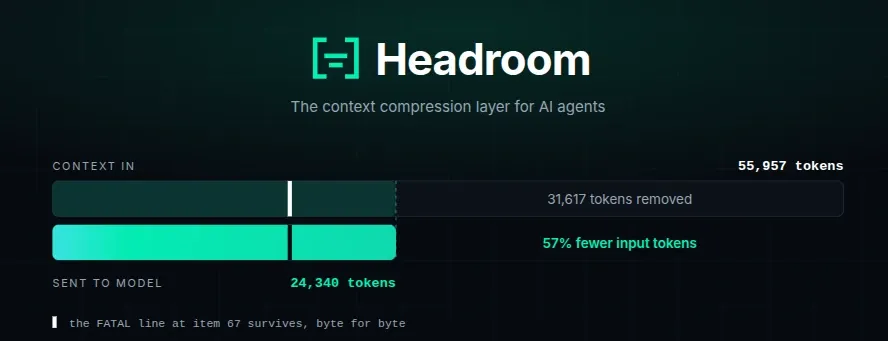
Headroom is an open-source context compression layer that sits between your AI agent and the LLM, stripping away redundant tokens from tool outputs, logs, code, and RAG chunks before they ever reach the model. Same answers, dramatically lower bills.
AI agent costs are spiraling out of control. A single debugging session can burn through 50,000+ tokens of tool output—most of it repetitive JSON, boilerplate logs, and code that the model doesn't actually need to read in full. Headroom solves this by compressing everything your agent sends to the LLM, cutting token usage by 20% for coding agents and 60–95% for JSON-heavy workloads, all while preserving answer quality.
Born from a Netflix engineer's side project, Headroom has exploded onto the scene with over 47,000 GitHub stars and a spot at #1 on GitHub Trending. But does it actually deliver? I installed it, ran it through real-world workloads, and dug into the community feedback to separate fact from marketing hype.
Three-Minute Human Summary
What it is: Headroom is a local compression proxy, library, and MCP server that compresses AI agent context (tool outputs, logs, code, RAG results, conversation history) before it reaches the LLM. It runs entirely on your machine—no prompts or file content are ever sent to an external service.
How well it works: The savings are real but workload-dependent. In Headroom's own benchmarks:
- Code search (100 results): 17,199 → 13,597 tokens (21% saved)
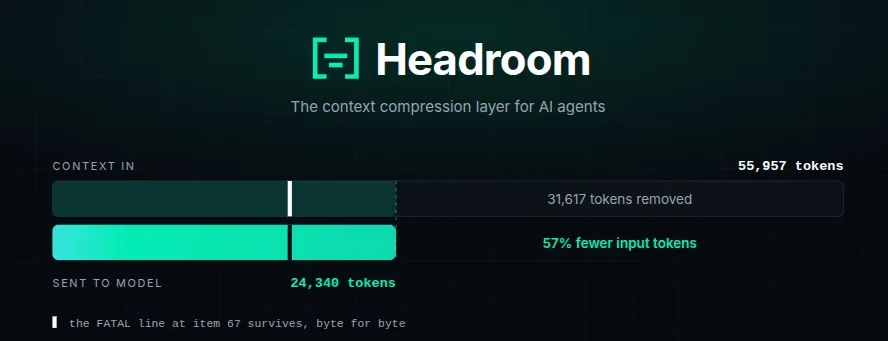
- SRE incident debugging: 55,957 → 24,340 tokens (57% saved)
- Codebase exploration: 58,801 → 33,895 tokens (42% saved)
- GitHub issue triage: 46,067 → 32,429 tokens (30% saved)
- JSON-heavy payloads: 60–95% reduction
Accuracy: Headroom maintains answer quality. On GSM8K math benchmarks, accuracy held at 0.870 ± 0.000. TruthfulQA showed no detectable difference. BFCL tool-use achieved 97% accuracy at 32% compression.
Deployment modes: Four ways to use it—as a Python/TypeScript library (compress()), a zero-code proxy (headroom proxy), an agent wrapper (headroom wrap claude), or an MCP server.
The catch: Real-world savings vary wildly. Independent tests have reported 7–30% reductions in typical agent workloads, not the 92% headline figure. The proxy can be resource-heavy, and Windows support has been problematic. Headroom shines on repetitive, structured data—JSON arrays, logs, and tool outputs—but does little for prose or already-dense content.
Who it's for: Daily coding agent users who want savings without touching their code. Teams working across multiple agents (Claude + Codex + Cursor) who want shared memory and deduplication. Anyone burning serious money on LLM tokens.
Who should skip: Users of a single provider's native compaction who don't need cross-agent memory. Anyone in a sandbox where local processes can't run. And if you're on Windows, proceed with caution.
General Information
| Attribute | Details |
|---|---|
| Developer | Headroom Labs (founded by Tejas Chopra, ex-Netflix) |
| License | Apache 2.0 |
| GitHub Stars | 47,000+ |
| Release Status | Active (150+ releases, 1,300+ commits) |
| Price | Free and open-source (managed enterprise tier available) |
| Supported Languages | Python 3.10+, TypeScript (SDK) |
| Platforms | macOS (Apple Silicon + Intel), Linux (x86_64 + aarch64), Windows |
| Deployment Modes | Library, Proxy, Agent Wrapper, MCP Server |
| Compressors | SmartCrusher (JSON), CodeCompressor (AST), Kompress-v2-base (ML text), CacheAligner (KV cache) |
Headroom was originally built by Tejas Chopra while at Netflix, who has since left to focus on Headroom Labs full-time. The project is open-source under Apache 2.0, with a managed enterprise offering for teams needing shared deployment, SSO, and support.
How It Works
Headroom positions itself as a transparent compression layer between your agent and the LLM. The architecture is straightforward:
Your Agent → Headroom (compression) → LLM Provider
But what happens inside Headroom is where the magic lies. The pipeline uses a ContentRouter that detects the type of incoming content and routes it to the appropriate compressor:
The Four Compression Engines
1. SmartCrusher (JSON)
Handles JSON arrays, nested objects, and mixed-type structures. It keeps error items, values outside statistical ranges, and first/last boundaries—selected from field-variance statistics rather than a keyword list. This is where the 60–95% savings come from.
2. CodeCompressor (AST-aware)
Works on source code for Python, JavaScript/TypeScript, Go, Rust, Java, C/C++, and Perl. Instead of treating code as plain text, it parses the Abstract Syntax Tree (AST) to preserve function signatures, key logic, and intent while stripping away imports, boilerplate, and formatting.
3. Kompress-v2-base (ML text compression)
A HuggingFace model trained specifically on agentic traces—the logs, debug output, and command-line noise that agents generate. It handles unstructured prose and logs, delivering 47–73% compression depending on redundancy.
4. CacheAligner (KV cache optimization)
This one doesn't compress content—it aligns it. When the same context appears across multiple turns, CacheAligner normalizes it so the provider's KV cache can be reused, saving compute on the backend.
Reversible Compression (CCR)
A standout feature: Headroom's Compress-Cache-Retrieve (CCR) mechanism stores the original content locally. If the LLM needs the full detail—say, to compare a before-and-after diff—it can call headroom_retrieve to fetch the original. This means Headroom can compress aggressively without the fear of permanent information loss.
Live-Zone Compression
Only new bytes are compressed—fresh tool output, the latest turn. The frozen prefix stays byte-identical, so the provider's cache survives and history is never dropped.
Performance & Benchmarks
Official Benchmarks
Headroom publishes a reproducible benchmark suite with seeded, offline tests:
| Scenario | Before (tokens) | After (tokens) | Saved |
|---|---|---|---|
| Code search (100 results) | 17,199 | 13,597 | 21% |
| SRE incident debugging | 55,957 | 24,340 | 57% |
| Codebase exploration | 58,801 | 33,895 | 42% |
| GitHub issue triage | 46,067 | 32,429 | 30% |
Accuracy Benchmarks
| Benchmark | Category | Baseline | Headroom | Delta |
|---|---|---|---|---|
| GSM8K | Math | 0.870 | 0.870 | ±0.000 |
| TruthfulQA | Factual | 0.530 | 0.560 | +0.030 |
| SQuAD v2 | QA | — | 97% | at 19% compression |
| BFCL | Tools | — | 97% | at 32% compression |
At N=100, a delta of ±0.03 falls inside the confidence interval, so TruthfulQA shows no detectable difference rather than an improvement.
Independent Real-World Tests
Independent testing tells a more nuanced story. One Japanese developer ran five realistic workloads and found:
- JSON code search (200 results): 12,298 → 8,609 tokens (30% saved)
- Large JSON tool output x2: 139,039 → 139,039 (0% saved—HTML misdetection caused no-op)
- Log text: 6,133 → 5,062 (17.5% saved)
- Conversation history + JSON mix: 1,130 → 1,130 (0% saved—protected by default)
The conclusion: "92% is real but limited to specific use cases"—particularly JSON-heavy code search and SRE debugging. The README itself honestly states "coding agents: 15-20% fewer tokens".
Another user reported actual compression rates of 7-19% in real-world usage, far from the marketing headlines.
Latency
Compression is fast: 0.21 ms p50 on a 10K-token JSON search result, 1.4 ms at 100K tokens. It "does not show up in agent latency".
Output Token Reduction
Headroom doesn't just compress what you send—it also trims what the model writes back. Verbosity steering appends a "be terse" note to the system prompt, and effort routing dials down thinking effort on routine turns (file reads, passing tests) while keeping full effort for new questions and errors. This is off by default (HEADROOM_OUTPUT_SHAPER=1).
Features Deep Dive
1. Four Deployment Modes
| Mode | Command | Use Case |
|---|---|---|
| Library | compress(messages) |
Python/TypeScript apps |
| Proxy | headroom proxy --port 8787 |
Zero code changes, any language |
| Agent Wrap | `headroom wrap claude | codex |
| MCP Server | headroom mcp serve |
Model Context Protocol clients |
2. Agent Compatibility
Headroom wraps a staggering list of agents:
- Fully supported (
headroom wrap): Claude Code, Codex, Grok CLI, Aider, Copilot CLI, VS Code Copilot, OpenClaw, OpenCode, Cline, Continue, Goose, OpenHands, Mistral Vibe, Oh My Pi, Kimi CLI, ZCode - Manual setup: Cursor
- Library only: Cortex Code (60–65% savings)
3. Cross-Agent Memory
One shared store across Claude, Codex, Gemini, and Grok, with automatic deduplication. When Claude compresses a file, Codex retrieves the same compressed representation—no redundant tokens, no repeated reads.
4. headroom learn — Failure Mining
Mines failed sessions and writes corrections to CLAUDE.local.md (gitignored by default), CLAUDE.md, AGENTS.md, GEMINI.md, or GROK.md.
5. Image Compression
A trained ML router delivers 40–90% reduction for images.
6. Telemetry (Opt-Out)
Anonymous beacon is on by default, reporting compression ratios, counters, provider/model IDs, OS, and architecture. Never sends prompts, completions, code, or file paths. Turn it off with HEADROOM_BEACON=off, DO_NOT_TRACK=1, or --offline.
Installation & Setup
Quick Install (60 seconds)
# Python (everything)
pip install "headroom-ai[all]"

# Or with uv (isolated)
uv tool install --python 3.13 "headroom-ai[all]"

# TypeScript SDK (library only)
npm install headroom-ai
Run It
# Zero-code proxy
headroom proxy --port 8787

# Wrap a coding agent
headroom wrap claude

# Health check
headroom doctor

# See savings
headroom dashboard
Extras
Granular extras: [proxy], [mcp], [ml] (Kompress-v2-base), [code], [memory], [vector], [image], [agno], [langchain], [evals]. Requires Python 3.10+.
Docker
docker pull ghcr.io/headroomlabs-ai/headroom:latest
Pricing
Headroom is completely free and open-source under Apache 2.0.
For teams, Headroom Labs offers a managed enterprise tier—shared always-on deployment, centralized config, org-wide dashboards, SSO, access control, air-gapped/VPC installs, and support. Pricing is custom; email [email protected] with your stack and monthly LLM spend.
Pros & Cons
Pros
✅ Significant token savings on repetitive, structured data (JSON, logs, tool outputs)
✅ Preserves answer quality—GSM8K accuracy unchanged, BFCL at 97%
✅ Four deployment modes—library, proxy, wrapper, MCP—fit any stack
✅ Zero code changes in proxy mode
✅ Reversible compression (CCR)—no permanent information loss
✅ Cross-agent memory—Claude, Codex, and Gemini share context
✅ Local-first—your data never leaves your machine
✅ Works with 100+ LLM providers via OpenAI-compatible API
✅ 47,000+ GitHub stars—massive community traction
Cons
❌ Real-world savings vary wildly—7–30% in independent tests, not always the 92% headline
❌ Content detection can fail—HTML misdetection causes 0% compression on some JSON tool outputs
❌ Windows support is problematic—multiple open bugs, crashes, broken service installation
❌ Proxy can be resource-heavy—high CPU, disk I/O, and thread usage even at idle
❌ Minimal gains on prose and already-dense content
❌ Blocks under min_input_words come back byte-identical—no compression on short inputs
❌ Requires Python 3.10+ and has platform-specific quirks (Intel macOS needs manual ONNX setup)
❌ Dashboard dollar figure requires Python 3.13 (LiteLLM dependency)
Headroom vs. Alternatives
| Tool | Deployment | Data Privacy | Reversible | Scope |
|---|---|---|---|---|
| Headroom | Local (proxy/library/MCP) | ✅ Yes | ✅ Yes | All context—tools, RAG, logs, files, history |
| Compresr | Hosted API call | ❌ No | ❌ No | Text sent to their API |
| Token Co. | Hosted API call | ❌ No | ❌ No | Text sent to their API |
| OpenAI Compaction | Provider-native | ❌ No | ❌ No | Conversation history only |
Headroom's key differentiators: runs locally (data never leaves your machine), covers every content type, and is reversible via CCR.
Verdict
Headroom is a genuinely clever piece of engineering that solves a real problem: the ballooning cost of AI agent context. The compression technology is sound, the accuracy preservation is validated, and the deployment flexibility is unmatched.
But the marketing has outpaced the reality. The 92% savings figure is real—but only for specific workloads like JSON-heavy code search and SRE debugging. In typical day-to-day agent usage, you're looking at 7–30% savings, which is still meaningful but not the jaw-dropping number the headlines suggest.
The project is actively maintained (150+ releases, 1,300+ commits) and has a vibrant community. The team is responsive, and the open-source nature means you can inspect, modify, and contribute.
Who should use it:
- Teams burning serious money on Claude Code, Codex, or Cursor tokens
- Developers running multi-agent workflows who want shared memory
- Anyone dealing with JSON-heavy tool outputs, logs, or repetitive data
- Engineers who want a zero-code solution they can drop in today
Who should wait:
- Windows users (until the stability issues are resolved)
- Users expecting 92% savings on every workload
- Teams working primarily with prose and already-dense content
- Anyone who can't run local processes (sandboxed environments)
Headroom is not a silver bullet, but it's a powerful tool in the right context. Install it, run headroom proxy, point your agent at it, and watch the dashboard for a week. The savings—whatever they are for your specific workload—will tell you if it's worth keeping.
Rating: 7.5/10 — Brilliant concept, solid execution, but the hype-to-reality gap and platform issues hold it back from perfection.
Headroom is open-source under Apache 2.0. This review was based on the GitHub repository, official documentation, independent benchmarks, and community feedback as of September 2026.